Overview
The Varietal Listings on Winery-Sage.com contain less around 50 wine grape types grown in California so finding specific types isn’t as problematic as it is in the Winery listing that contains hundreds of entries. Still, it can be convenient to eliminate some styles so the entire table shows up on one screen. The Quick Search function looks for anything that matches the exact set of characters that you type in. In its default state, the Encyclopedia Varietal Report shows all known Varietals grown in California.
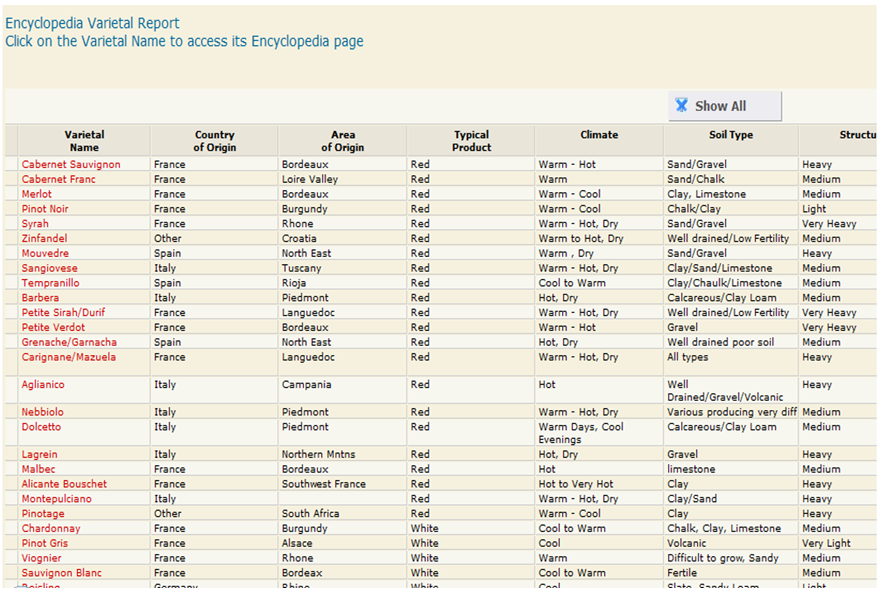
- Note that the searches are not case sensitive meaning it doesn’t matter if UPPER CASE or lower case letters are used.
- The search is not contained to only the information that you can see on the report. Any entry in the database where that combination of characters is used will show up. The screen shots used in this tutorial only show sample data. Do not rely on them for accurate information.
- Only one search term at a time can be used for this function.
- It’s best to take a quick look through the listing to see the types of information that is available to search and what terms Winery-Sage.com uses to describe them.
- When using Quick Search feature, be sure to type in the values you would find in the columns of the table, not the title of the column itself.
Example 1
Typing “Bordeaux” in the Quick Search box will show any varietal that originated in the Bordeaux region of France as well an any also used in a Bordeaux style blend

The Quick Search will find the following Varietal(s).

Example 2
Looking for Italian varietals is easily accomplished by typing ‘Italy” in the Quick Search box.

The Quick Search will find the following Varietal(s).
